)
)
)
TTO Printhead Complete Handbook: How to Prolong Service Life & Solve Common Printing Faults

Working Principle of TTO Printheads
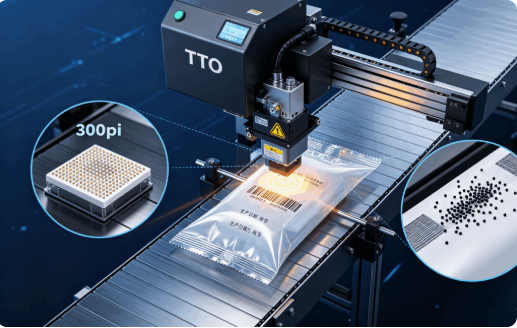
The printhead is equipped with a dense array of micro-heating elements (typically 8–12 dots per millimeter, equivalent to 300 DPI resolution). Controlled by electronic signals, these elements heat up instantaneously to melt the ink on the thermal ribbon. Under mechanical pressure applied between the printhead and the rubber platen, the molten ink is firmly transferred onto the packaging material’s surface, creating a crisp, clear print.
The printing process relies on coordinated dynamic movement: intermittent printheads move downward to contact the material for printing before retracting, whereas continuous printheads operate in synchronization with the continuously moving packaging material to enable uninterrupted printing.
Classification and Structure of TTO Printheads
Classification by Operating Mode
Intermittent Printhead: Suitable for intermittent-motion packaging machines. It moves downward to contact stationary material for printing and returns to its original position after each print cycle.
Continuous Printhead: Suitable for high-speed continuous packaging lines. It operates in stable synchronization with continuously moving material to achieve seamless printing.
Basic Structure
A standard TTO printhead primarily consists of heating elements (ceramic-glass assembly), electromagnetic coils, a transmission mechanism, and a complete printhead assembly featuring a spring-loaded quick-release system. Most models utilize a modular design to facilitate removal, replacement, and routine maintenance.
Key Performance Parameters
Resolution (DPI): The standard configuration is 300 DPI (12 dots per millimeter), ensuring fine print detail and the clear display of characters as small as 1 mm.
Print Speed: Adjustable speed ranges from 40 mm/s to 600 mm/s. Actual operating speed is influenced by printhead heating efficiency, material transport speed, and the complexity of the printed content.
Heating Element Lifespan: As a consumable component, the printhead’s lifespan is typically measured by total print length (up to 100 km) or cumulative operating hours (up to 30,000 hours). Durability depends on material quality, the operating environment, and the quality of routine maintenance.
Guidelines for Use and Standard Maintenance
Regular Cleaning: Ink residue and dust tend to accumulate on the printhead surface; this can impede heat transfer and potentially burn out the heating elements. It is recommended to clean the printhead using isopropyl alcohol and a lint-free cloth after every six rolls of thermal ribbon, or to perform routine cleaning at regular intervals.
Parameter Optimization: Set appropriate printing temperatures (density) and pressure levels. To extend the printhead’s lifespan, always use the lowest applicable air pressure and temperature settings that still ensure satisfactory print quality.
Prevention of Physical Damage: Avoid direct contact between the printhead and rough materials or metal components to prevent abrasion and scratches. Allow the printhead to cool completely before replacement to avoid damage caused by thermal shock or vibration.
Common Faults and Troubleshooting
Blurred or Intermittent Printing: Usually caused by dirt accumulation on the surface or damage to heating elements. This issue can be resolved through professional cleaning or by replacing the printhead.
Fading Print Color: Primary causes include a dirty printhead, misalignment between the printhead and the platen roller/pad, or printhead aging. Corresponding solutions include cleaning, adjusting the alignment, or replacing the printhead.
Missing Dots: Likely caused by localized dirt contamination or physical damage to the printhead. First, clean the printhead; if the problem persists, replace the printhead.
)

)
)
)
)

)
)
)
)
)